
Wondering what gems you missed in 2012? Here is an exhaustive “list of lists” of the best books of 2012…


We brazenly lifted this image from Sen. Sanders’ website and trust he doesn’t mind as long as it encourages Vermonters to VOTE!
Brattleboro residents: Tuesday’s voting will be 9a.m.-7p.m. at the Brattleboro Union High School gymnasium on Fairground Road. The Elections page on the Town’s website gives details, including sample ballots so you can plan your choices ahead of time.
For help with decision-making, try the VTDigger site, a project of the Vermont Journalism Trust. They have a handy “Compare the Candidates” feature on their front page. Thanks, Jess Weitz, for pointing out this useful site.
JMW

Folks who are interested in the transition town discussion: we have multiple copies of The Transition Companion: Making Your Community More Resilient in Uncertain Times, by Rob Hopkins (Chelsea Green, 2011). You’ll find it in the mezzanine under 307.14 HOP. Time to start your book discussion group?
JMW
A message from Wendy Cornwell from the Brattleboro Memorial Hospital.
Hello,
BMH is currently conducting a Community Health Needs Assessment to determine health needs and gaps in our community.
All community members are welcome to participate in this anonymous survey. It takes about 10 minutes to complete. The link to the survey can be found on SharePoint or below in this email. If you know someone in the community who would prefer to complete a paper survey, please let me know & I will be happy to provide one along with a post-paid envelope in which it can be returned. Your thoughts and opinions are valuable. Thank you in advance if you choose to participate in this survey.
Survey Link: https://www.surveymonkey.com/s/SLMTZ2Z
Wendy
Wendy Cornwell RN, BS, BSN
Director Community Health & Hospital Education
Vermont Blueprint for Health Project Manager
Brattleboro Memorial Hospital
17 Belmont Avenue
Brattleboro, Vermont 05301
Phone: (802) 257-8325
E-Mail: wcornwell@bmhvt.org
 All of these elegies are making me nostalgic for ye olde print Encyclopedia Britannica, but let’s not forget that it lives on electronically and is available with your library card. With admiration for its will to survive, I offer this reprint of two earlier blog posts on the E.B.:
Part 1: Britannica vs. Wikipedia
Wikipedia addicts: your options have expanded. The Brooks Memorial Library’s website offers access to Britannica Online free to all from inside the Library. Cardholders also have access from home. Click on Resources > Reference, and log in with your library card number.
 Why choose Britannica over Wikipedia? Because it is, according to itself, “the oldest English-language general encyclopaedia,” first appearing in Edinburgh, Scotland, in 1768. It has the weight and authority of centuries behind it. And if you’re working on a paper, chances are your teacher will accept it as a legitimate source in your bibliography.
 Why choose Wikipedia over Britannica? It’s drawing on the brilliance of many authors and has an interesting 21st-century method for establishing authority. It’s very strong in particular subject areas; I love it for questions on popular culture, for example. But it isn’t considered a reliable source in many academic environments.
Today, I staged a Britannica/Wikipedia death match over Italian filmmaker Federico Fellini (born January 20th, 1920), and these are my quick impressions:
 Britannica: Nice, long, detailed article about his life and works, with critical commentary. Surprisingly, it has a wimpy bibliography, and the filmography is incorporated into the essay; there’s no handy list. But it’s nicely illustrated with public-domain photos.
 Wikipedia: This one also has a substantial essay, but it’s more biographical than critical. Excellent bibliography and a handy filmography and awards list – plus, you could read the article in Fellini’s native language! Not many photos; try Google Images for that.
 In other words, both sources have unique material, so why limit yourself? It takes just minutes to search them both, and your knowledge will expand for your efforts.
Photo credits: Fellini and Masina on the set of La Strada, still from 8 1/2, Mastroianni & Ekberg in still from La Dolce Vita. Courtesy Britannica Online.
Part 2: Using Britannica Online
On the Library’s website, click on Resources > Reference > Britannica Online. It will prompt you for your library card number: type the whole 14-digit number with no spaces.
Once you’re in, you have various options for searching. They always have fun features like “This Day in History,” if you just want to browse. If you want to research a specific topic, you can type a keyword into the search box, but that’s not my favorite way; I think you get better results by clicking the link called The Index, which is near the top of the screen, below the search box, next to the word BROWSE. On the Index screen, you can click the first letter of the word you want to search or use the Index search box.
For example, find the word ECOLOGY in the index, either by clicking on the E and working your way in through the alphabetical list or by typing the term into the Index search box. There are two entries for the word. If you click the first one, it produces a list of reference links to related articles in the online encyclopedia. Even better, it displays several links on the left side of the screen called Content related to this topic. If you click on the link for “Main Article,” you’ll get a nice 5-page overview.
To be honest, I think that the online Britannica has to work on its design. The way they display search results often obscures the main articles and highlights passing references. Once you get comfortable with it, though, it’s wonderful having online access to this detailed, authoritative encyclopedia.
JMW
revised 3/27/12
So, Library patrons, you don’t find our hold-placing system amazingly intuitive? Hard to believe, but try these. Sorry the images are small: you might have to zoom to read the text.


Good luck! And call us if you need us.
JMW

Moore and Stephenson (no dates). American Library Association Twenty-first annual conference, Atlanta, Georgia, May 8-13, 1899. Courtesy http://blogs.law.harvard.edu/finearts
Are you exploring possible career paths? Considering starting up a business of your own? Looking for guidance on marketing your services as a private contractor? Trade and professional associations are a useful resource in all of these circumstances. They offer opportunities to learn about a career or business field, connect with other professionals, and benefit from special services provided to association members.
How do you find associations in your field? A simple keyword Internet search (for example, paralegal associations) might be all you need. On the other hand, there are advantages to using selective, published association directories, which can help you sort the well-established organizations from the fly-by-night groups. Also, published directories offer the option of browsing, which can lead to new, creative ideas. Maybe you didn’t know that there is an American Society of Indexing or a Biomass Power Association. Browsing can lead a researcher down some interesting paths she hadn’t considered before.
The Brooks Memorial Library offers association-related material in print form and online. Here’s a roundup of resources:
In print, on the Library’s shelves:
- Encyclopedia of Careers & Vocational Guidance. Ferguson Publishing, 2010. REF 331.7 ENC. We tend to call it “Ferguson’s” around the Library. It’s a five-volume set of profiles of various career fields, including information on things like training, earnings potential, and typical work environments. Each entry also includes contact information and website urls for trade and professional associations in that field.
- Survey of American Industries and Careers. Salem Press, 2012. Hot off the press, and just reviewed by our own Jerry Carbone in the Booklist review journal. It hasn’t even been cataloged yet, but you will find it soon in the Reference area near the Ferguson’s. It updates and supplements Ferguson’s beautifully, so you’ll want to check both for information on your field, including information on associations.
Online, through the Library’s website (access from home with your card):
- Business & Company Resource Center. On the website, select Resources > Business. Search for your field in the Industries section. If you find a profile for your industry, look for the “Associations” tab on the far right of the screen. It will bring up entries from published directories of national, international, and U.S. regional associations.
- Small Business Resource Center. On the website, select Resources > Business. On the first screen, click on “Business Types,” choose your field of interest, and then click on the “Directories” tab. It will link you to entries from business reference books, including roundups of trade and professional associations for small businesses of all kinds.
Online, free to all:
- Associations on the Net, a special collection of the Internet Public Library. www.ipl.org. Click on “Special Collections Created by IPL2,” and then choose the Associations on the Net link under “Other Collections.” Use the subject links on the left side of the screen to zero in on associations in your field. All of them have subdivisions to get even more specific information; for example, “Health and Medical Sciences” includes 20 or so specific health-related fields, all with their own associations.
- Occupational Outlook Handbook, from the U.S. Bureau of Labor Statistics. http://www.bls.gov/oco. A free source that covers some of the same ground as Ferguson’s and the Survey of American Industry & Careers. Includes links to trade and professional associations with a disclaimer that the links are for convenience and do not constitute an endorsement.
May you find many rewarding associations!
JMW

The Vermont Digital Newspaper Project has digitized over 11,000 pages of old Vermont newspapers, including the early years of Brattleboro’s Vermont Phoenix. Read all about it on the VDNP blog, or go right to the papers at Chronicling America, a project sponsored jointly by the Library of Congress and the National Endowment for the Humanities.
More papers are coming, including a precious handful of issues of the Windham County Democrat, edited by noted feminist Clarina Howard Nichols.
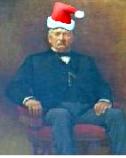
- George J. Brooks, 1818-1886, our original benefactor

Happy Holidays!
 Ready Reference